Apple introduced the next-generation of its mobile operating system in June 2017 at the WWDC. CEO Tim Cook said the update is going to bring the best and the most advanced operating system. Here’s what makes iPhone and iPad much more useful than ever.
Must Read:How to clear cookies on iPhone ?
Now when we are standing two months away from the launch many people are enjoying the 4th beta version of the OS and believe us OS is full of new features and great improvements.
Today in this article, we are going to talk about the 9 awesome unknown features of iOS 11 which will blow your mind.
Business Chat bots
Apple at WWDC 2017 in June announced a key partnership with Nuance to create a bot-based customer service ecosystem for Messages, called “Business Chat.” Apple’s plan is to integrate Nuance’s Digital Customer Engagement Platform with Apple Business Chat. This will enable new breeds of A.I.-based intelligent assistants in Messages and means you’ll see a little messages icon pop up on brand websites and in search results. Nuance’s asynchronous messaging tech is already used across other messaging platforms that support bots. Major companies, including Bank of America, Domino’s, FedEx and USAA, already use Nuance’s solution.
A faster, smarter Safari
The security enhancements will likely have the biggest effect on users. These include better, easier cookie blocking and Intelligent Tracking Prevention, which uses built-in machine A.I. to reduce cross-site tracking by identifying and limiting this practice.
Safari supports a new video codec, HEVC (H.265). This will mean higher-quality video at much lower file sizes compared to the older H.264.
The browser’s search bar now allows you to track flights and define words.
Must Read:How to find kik chat rooms?
PDF creation using the browser is also improved: Just tap Share and choose Markup as PDF to make a PDF you can annotate.
Instant Wi-Fi
iOS 11 users can approve others to use their Wi-Fi network by holding the devices close together, authorizing them, and transferring the password automatically. This should help schools and enterprises more easily manage routine Wi-Fi password changes.
QR Code scanning
Related:documents and data iPhone
The Camera app will automatically scan and understand QR codes. Point your device at the code, tap to focus, and a notification box will let you respond to that code. This will come in useful for automatic setup of things such as Wi-Fi networks, HomeKit devices, contact cards, website URLs and more.
Must Read: iOS 11 beta 4 reveals one of the cool features for iPhone and iPad users
Core NFC
This new iOS 11 framework lets developers create apps that can read NFC tags. It’s a little limited at the moment — it only works one-way, so you can use it to access information about museum exhibits and visitor attractions rather than for more sophisticated payment systems.
The image thing
Apple’s been working hard to improve your images. Last year’s introduction of the bokeh effect in the iPhone 7 Plus was a great example of this since it basically put a pro-photo portrait camera in your pocket. iOS 11 maintains this tradition:
- The biggest enhancement is the introduction of support for the HEIF photo format. Based on the video-focused HVEC format, HEIF is capable of saving images around half the file size of JPEGs but at much higher quality (up to 16-bit, versus 8-bit).
- Apple has developed a way to transcode images from HEIF to JPEG on the fly, without performance degradation.
- If you use an iPhone 7 Plus, Portrait Mode in iOS 11 supports optical image stabilization and HDR so you can expect much better images in low light.
- Apple has also added new filters to improve images, including one designed to make skin tones appear more natural.
- Live Photos gains several improvements. Not only can you now share these live moments with others as GIF files (or as a mp4 on Android), but you get to choose the key image and can apply three new effects: loop, bounce and long exposure. (The latter blurs anything that’s moving within a frame so you can focus on the subject).
Document scanning and Notes
Apple’s Notes app spent years in the wilderness before getting much attention. By the time iOS 10 arrived, Notes had already become a sort of low-budget replacement for Evernote, but it gets much more versatility in iOS 11. Certainly, for business users it has become an excellent tool to keep receipts and other expenses in one place when traveling:
- You can scan documents from within a Note; just tap the plus sign and choose Scan Documents, then point your device until the document is in focus and highlighted by a yellow tint. You can then keep, share or even sign the scan (the latter on the iPad Pro using an Apple Pencil).
- Apple has added the capacity to draw inside Notes using the familiar sketch tools interface from the iPad.
- You can pin notes to the top of your list, more easily search through your notes, and quickly place notes within subject folders.
A few more things
There are many more improvements within iOS 11, including a one-handed keyboard option, person-to-person payments within Messages, the capacity to record and broadcast what’s happening on-screen, and App Offloading, which lets you delete an app you don’t use often while keeping the app data. When you need it, just download the app again to use that data. You’ll also find improved screenshot annotation and significant additions to CareKit and ResearchKit, which provide a platform for health and medical equipment developers.
If this has whetted your appetite enough to try iOS 11 for yourself, you can register to join Apple’s iOS 11 Public Beta program. Otherwise, wait until the final version arrives, when the bugs should have been ironed out.
Must Read: One of the Biggest features of iPhone 8 has been removed
Augmented reality
Apple’s newly introduced ARKit framework lets developers create augmented reality experiences that can be accessed using compatible (A9- and A10-processor-powered) iOS devices — meaning iPhones and iPads released since September 2015. The software only recognizes horizontal planes today, but this will change in the future, and it’s expected to help companies explore new opportunities, from online retail to gaming to unified communications. Apple’s AR partners include Valve/SteamVR, Unity and Epic Games.
What’s critical here is that hundreds of millions of devices will immediately support AR once iOS 11 ships, making this an extremely viable VR platform development opportunity.
Source
How to Bypass iPhone Password without Restore (Using Siri)
Siri is official Apple device voice assistance and it provides answers to your questions and commands either from the contents on your iPhone or from the internet. However, there is a little loop in Siri that can help you bypass your iPhone lock screen if you’re still running iOS 8 - 10.1.
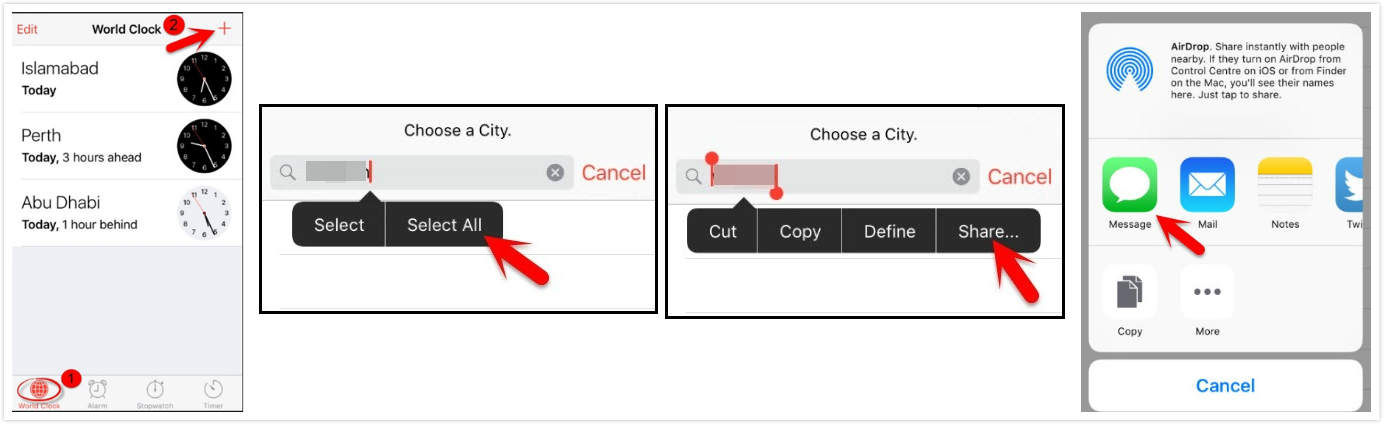
Step 1. Press and hold down the iPhone home button to activate Siri. Then ask Siri “What time is it?” Siri will show you the clock icon. Tap on it to open World Clock feature.
Step 2. Tap “+” button and then simply enter any words when searching the city. Tap the words to choose “Select All”.
Step 3. Choose “Share” and click “Message icon”. It will lead you to edit a new message.
Step 4. In the “To” field, tap any words and then tap the “return” button in your keyboard. Your textual content will become green.
Step 5. Now tap “+” icon and then “Create new contact”.
Step 6. Tap "add photo" and select “Choose Photo”. It will open the photo library on your iPhone.
Step 7. Tap the home button after several seconds and it will lead you to your iPhone home screen!
Disadvantages:
This method is only available for iOS iOS 8 – 10.1.
Even if your iPhone is in iOS 8 to iOS 10.1, it doesn’t always work. It works depending on luck.
The Siri feature should be enabled when your iPhone is locked.
It helps bypass the password, but it doesn’t change or reset your password. Every time you want to get into your locked iPhone, you need to follow those steps.
How to Bypass iPhone Passcode via iCloud
Unfortunately, this method only works for those who have enabled Find My iPhone on their device before it was locked.
Step 1. Go to https://www.icloud.com/#find and sign in with уоur Aррlе ID and раѕѕwоrd.
Stер 2. Cliсk “Find iPhone”.
Step 3. Click “All Devices” аt thе tор оf уоur brоwѕеr windоw.
Step 4. Sеlесt the iPhоnе that you would like to unlock.
Step 5: Cliсk “Erаѕе iPhone” and confirm to proceed
After these steps, your iPhone will be erased. Nevertheless, don’t forget that this method is for only those who have enabled Find My iPhone. Your iPhone should also connect to internet. Jihosoft iPhone Backup Extractor Extract and recover all types of data from iPhone backup files, such as camera roll photos, videos, SMS, contacts, reminders, WhatsApp, and etc.
Gihosoft Free iPhone Data Recovery is a professional iPhone Data Recovery software to get back all your lost text message, photo, video, call history, note, contact and more from iPhone/iPad/iPod Touch.